
Potato.cam
POTATO CAM is the next level in getting lenses to your stream. It's a standalone desktop app, that uses Snap's Camera Kit technology to be an easy, lightweight, and powerful solution to bringing the latest potatoes, pickles, cheese puffs or whatever into your streaming pipeline. It uses your Patreon login to give you access to the lens library--and your own private custom lenses! No more hunting down URLs. No more camera priority headaches in OBS. And no more having to hit that "interact" button all the time! We've got hotkey support. This works with OBS, TikTok Live, StreamLabs.
Free and Paid Lens Libraries of all your favorite lenses
Custom Private Lens access
Integration with Patreon account
Mac and PC compatible
Optimized to work with OBS
Quickly swap between lenses + save favorites
Hotkeys and shortcuts
Download available through Gumroad
By downloading and using this software, you agree to my Terms of Service
Potato Cam 1.3 Setup Instructions
VIRTUAL CAMERA SUPPORT.
Now this is not a direct virtual camera and will require a second download since we are powered by Spout2 a very popular used Vtuber integration.
Be mindful that this WILL USE MORE RESOURCES so if your computer struggles currently it will struggle a bit more, due to it running a full virtual camera wrap now
Download the Spout2 Camera receiver either from this message or from - https://github.com/leadedge/SpoutCam/releases/tag/2.036
Put this file folder somewhere you will not touch it
Open the file and access SpoutCamSettings.exe and change your settings to 30fps, 1280×720 resolution.
Click register.
Open Potato.cam set your lens etc that you want to use
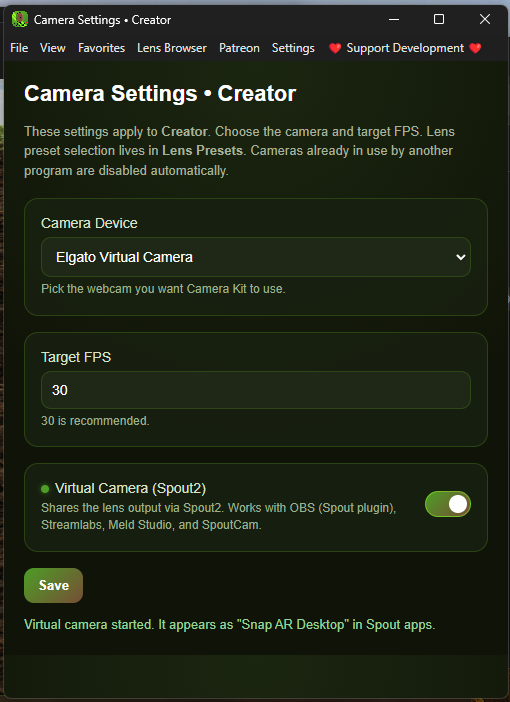
Set FPS here to match what we put in the SpoutCamSettings.exe (30FPS) this HAS TO BE 30FPS or else it will drain resources and lag, (60fps integration is coming later on)
Open camera settings - flip on Virtual Camera (Spout2)
Open up your app of choice and select Spout Camera as your camera.
Remember to enable Spout Virtual camera in Potato Cam!
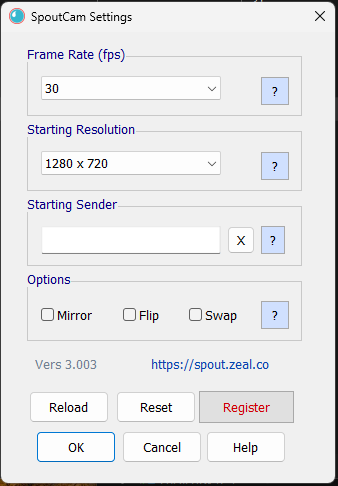
Spout Cam Settings